


Thank you

Thank you!

An Ooma Office Sales Representative will be in touch shortly.

If you do not receive the call within a few minutes, please call: 877-353-5185

Popup images - person doing consultation

Let’s talk!

Our team can help you find the right solution.

Spectacular Spring Specials for Small Businesses! Call 877-353-5185 today.
LIVE CHAT
All systems are 100% operational.
Chat support

Thanks — We’ve Got Your Request.

A member of our support team will reach out to you as soon as we’re back online. In the meantime, you can keep browsing our support articles.

Need an answer right now?

Most questions are already answered in our support articles — setup guides, troubleshooting and how-tos.

Visit the Support Site
Or leave a message and we’ll follow up
By clicking below you expressly agree to and acknowledge the statements set forth in this
link By submitting your contact information, you are giving express written consent to receive on your telephone, mobile or other electronic device auto-dialed, pre-recorded, artificial or other automated telemarketing calls or texts (SMS & MMS) from Ooma, its marketing partners, or third parties acting on Ooma’s behalf, even if your number is a on a corporate, state or federal Do Not Call (DNC) list. Carrier fees may apply. Consent is not a condition of purchase. It also indicates that you agree to Ooma’s Privacy Policy.
and in the Ooma Rewards Program Terms and Conditions.
Fix error

Setting up Ooma Connect when your existing connection is not where you will place your LTE antenna

Last Updated: March 2, 2026

As you are setting up Ooma Connect, you may face a challenge where the best location for the Ooma LTE 460 adapter is far away from the location of your router or your existing ISP equipment. There are two options to resolve this situation:

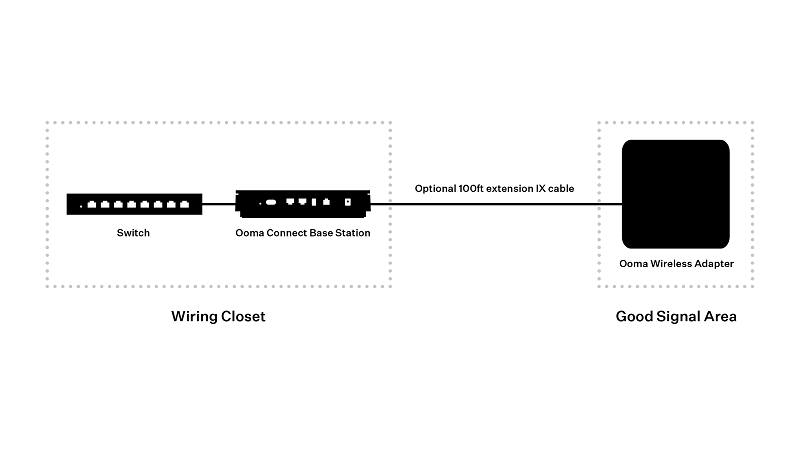
  1. If the distance is under 100 ft, you can purchase the option 100 ft extension cable for Ooma Connect. Place the Ooma Connect Base Station near your existing router (possibly located inside a wiring cabinet). Use the Ooma Connect app to help you place the antenna in the optimal location. Run the extension cable (sold separately) between the Ooma Base Station and the LTE adapter antenna. This is the preferred soluton if you are using Ooma Connect as a supplementary backup connection with your existing ISP as the primary connection. wiring 1
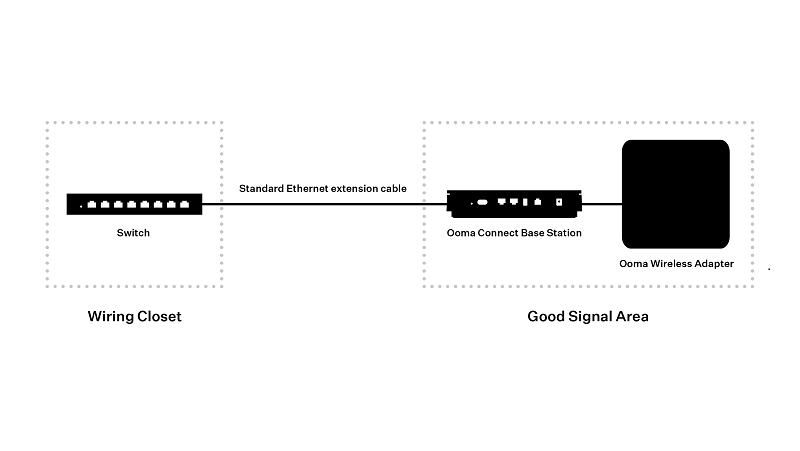
  2. Alternatively, you can keep the Connect Base Station near the LTE adapter antenna. Run a standard Ethernet extension cable with RJ45 connectors (sold separately) from the LAN port of the Base Station to the modem or router’s location (possibly a wiring cabinet). This solution will work up to a distance of 300 feet. If you are using Ooma Connect as a supplementary backup connection, you will also need to run a long Ethernet cable between your existing ISP’s moedem and the WAN port on the back of the Ooma Connect Base Station.\ wiring 2
You may want to check out our instructional video for more information.